
How to Watch IPTV on PC and Mac in 2026: Best Players and Setup Guide
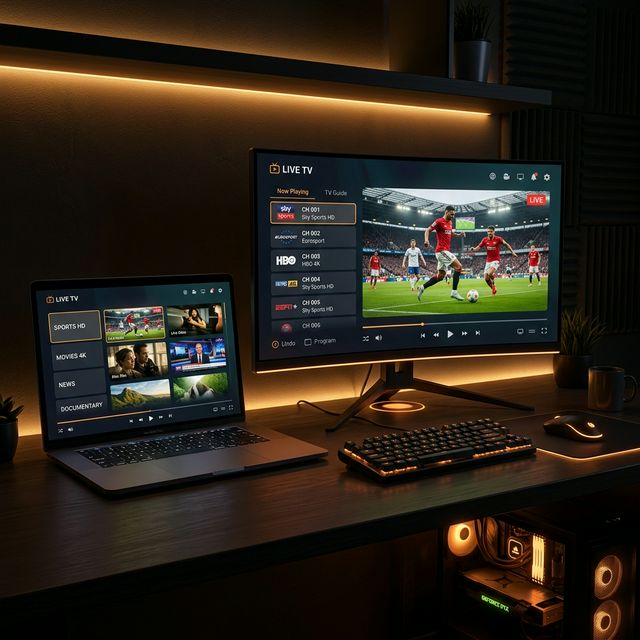
Watching IPTV on Your Computer
🔥 Stop Searching, Start Streaming!
Why settle for buffering and locked channels? Venom IPTV gives you access to 35,000+ premium channels, global sports in 4K, and a massive VOD library.
View Pricing PlansWhile most people associate IPTV with Firestick and Smart TVs, your Windows PC or Mac is an equally capable IPTV device. Whether you want to watch at your desk, use a second monitor for live sports, or simply prefer the convenience of your laptop — several excellent IPTV players are available for desktop platforms.
Best IPTV Players for Windows PC
1. IPTV Smarters (Windows Version)
The desktop version of the popular mobile app, offering a familiar Netflix-style interface.
How to install:
- Visit the IPTV Smarters official website
- Download the Windows installer
- Run the installer and follow the prompts
- Open the app and login with Xtream Codes API
Pros: Familiar interface, Xtream Codes support, EPG, VOD library Cons: Occasional performance issues on older PCs
2. VLC Media Player (Free)
VLC is the most versatile media player ever created — and it works perfectly for IPTV using M3U playlists.
How to set up:
- Download VLC from videolan.org
- Open VLC → Media → Open Network Stream
- Paste your M3U URL
- Click Play
- Access the channel list via View → Playlist
Pros: Completely free, lightweight, supports every format Cons: No visual channel guide, basic interface, no Xtream Codes support
3. MyIPTV Player (Windows Store)
Available directly from the Microsoft Store, making installation effortless.
How to install:
- Open Microsoft Store → search “MyIPTV Player”
- Download and install
- Open → add your M3U playlist URL or EPG source
- Browse and watch channels
Pros: Official Microsoft Store app, EPG support, channel favorites Cons: M3U only (no Xtream Codes), occasional ads in free version
4. Kodi with PVR IPTV Simple Client
Kodi is a powerful open-source media center that supports IPTV through add-ons.
How to set up:
- Download Kodi from kodi.tv
- Go to Settings → Add-ons → Install from Repository
- Navigate to PVR Clients → PVR IPTV Simple Client
- Configure with your M3U URL and EPG source
- Enable the add-on → channels appear in Kodi’s TV section
Pros: Full media center experience, extensive customization, EPG grid Cons: Complex setup, heavier resource usage
Best IPTV Players for Mac
1. VLC Media Player
Same as Windows — download the Mac version from videolan.org. M3U playlist setup is identical.
2. IINA Player
A modern, elegant media player designed specifically for macOS.
How to set up:
- Download IINA from iina.io
- Open → File → Open URL
- Paste your M3U playlist URL
- Browse channels from the playlist panel
Pros: Beautiful native macOS interface, hardware-accelerated playback Cons: Basic IPTV functionality, no EPG support
3. GSE Smart IPTV (macOS)
Available on the Mac App Store — the same app used on iOS.
How to install:
- Open Mac App Store → search “GSE Smart IPTV”
- Download and install
- Add your M3U or Xtream Codes playlist
- Browse and watch
Pros: Xtream Codes support, EPG, familiar iOS interface on Mac Cons: Designed for touch — mouse navigation can feel slightly awkward
4. Kodi
Works identically on Mac as on Windows. Same setup process with PVR IPTV Simple Client.
Comparison Table: PC/Mac IPTV Players
| Player | Windows | Mac | Xtream Codes | M3U | EPG | Price |
|---|---|---|---|---|---|---|
| IPTV Smarters | ✅ | ❌ | ✅ | ✅ | ✅ | Free |
| VLC | ✅ | ✅ | ❌ | ✅ | ❌ | Free |
| MyIPTV Player | ✅ | ❌ | ❌ | ✅ | ✅ | Free |
| Kodi + PVR | ✅ | ✅ | ❌ | ✅ | ✅ | Free |
| GSE Smart IPTV | ❌ | ✅ | ✅ | ✅ | ✅ | Free |
| IINA | ❌ | ✅ | ❌ | ✅ | ❌ | Free |
Using Your PC as an IPTV Media Center
Dual Monitor Sports Setup
One of the best PC IPTV use cases is running two streams simultaneously on dual monitors:
- Monitor 1: Premier League match on Sky Sports
- Monitor 2: La Liga match on BeIN Sports
Open two VLC instances or use Kodi’s split-screen add-ons.
Connect PC to Your TV
Turn your PC into the ultimate streaming box:
- Connect your PC to your TV via HDMI cable
- Set the TV as your primary or extended display
- Open your IPTV player in full-screen mode
- Use a wireless keyboard/mouse for navigation
Recording IPTV on PC
VLC supports basic recording:
- Start playing a channel
- Click Playback → Record (or press
Shift+R) - VLC saves the recording to your Videos folder
For advanced recording with scheduling, use Kodi with its PVR recording features.
Optimizing PC/Mac for IPTV
Install a VPN
Desktop VPN apps offer the best performance and easiest setup:
- NordVPN, ExpressVPN, Surfshark all have dedicated Windows and Mac apps
- Enable the VPN before opening your IPTV player
- Connect to a server close to your location for lowest latency
Hardware Acceleration
Ensure hardware acceleration is enabled in your player:
- VLC: Tools → Preferences → Input/Codecs → Hardware-accelerated decoding → Automatic
- Kodi: Settings → Player → Videos → Allow hardware acceleration
Close Background Apps
Close bandwidth-heavy applications (downloads, cloud sync, Windows updates) while streaming to maximize available bandwidth for IPTV.
[!IMPORTANT] Ready to experience the ultimate TV package? Join over 12,000 satisfied customers who have switched to Venom IPTV. We offer dedicated 24/7 support, anti-freeze servers, and instant activation for all devices.
Frequently Asked Questions
Is VLC the best free option for IPTV on PC?
Yes, for basic IPTV playback. VLC is free, lightweight, and supports M3U playlists. However, it lacks EPG, Xtream Codes support, and visual channel browsing. For a richer experience, try IPTV Smarters (Windows) or Kodi.
Can I watch IPTV in a web browser?
Some IPTV providers offer web-based portals, but browser-based IPTV is generally less reliable than dedicated apps. Dedicated players like VLC or Smarters provide better performance.
Does IPTV on PC use more internet data?
IPTV uses the same bandwidth regardless of device. HD streams use approximately 3-5 GB per hour, and 4K streams use 10-15 GB per hour.
Can I use my laptop for IPTV while traveling?
Absolutely. Install a VPN and your IPTV player before traveling. Connect to any Wi-Fi network, activate your VPN, and stream as normal.
Conclusion
Your PC or Mac is a fully capable IPTV streaming device. VLC is perfect for quick, simple playback. IPTV Smarters provides the best full-featured experience on Windows. GSE Smart IPTV is ideal for Mac users. And Kodi offers the ultimate customizable media center experience on both platforms.
Ready to Cut the Cord?
Experience premium IPTV with 35,000+ channels in 4K quality. No buffering, no contracts.
Get Started NowYou Might Also Like
How to Fix IPTV Buffering: 10 Proven Solutions That Actually Work
Struggling with IPTV buffering? Learn 10 expert-tested methods to eliminate freezing, stuttering, and lag on any device including Firestick, Smart TV, and Android.
How to Install IPTV on Amazon Firestick in 2026: Complete Step-by-Step Guide
Learn how to install and set up IPTV on your Amazon Firestick in under 5 minutes. Covers TiviMate, Smarters Pro, sideloading, and troubleshooting tips.
How to Install IPTV on Firestick (2026 Guide)
Learn how to properly sideload and install any premium IPTV service on your Amazon Fire TV Stick in under 5 minutes with our complete walkthrough.
IPTV EPG Guide: What Is an Electronic Program Guide and How to Set It Up
Learn what an IPTV EPG is, why it matters, and how to configure it in TiviMate, Smarters, and other apps. Complete Electronic Program Guide setup tutorial.
IPTV on Apple TV: Best Apps and Complete Setup Guide for 2026
Learn how to set up IPTV on Apple TV in 2026. Covers the best IPTV apps for tvOS, step-by-step installation, and tips for the best streaming experience.
IPTV Smarters Pro Setup Guide 2026: Installation on Every Device
Complete IPTV Smarters Pro setup guide for Firestick, Android, iOS, Smart TV, and PC. Step-by-step instructions with screenshots and troubleshooting tips.